
Yo, gamers! In 2026, the collab between Fortnite and Discord is still going strong, and they've dropped another banger of a freebie for the community. This time, it's all about the iconic Shield Potion, one of the most recognizable items from the Battle Royale island. If you're looking to spice up your Discord profile with a fresh piece of Fortnite flair without spending a single V-Buck, you've come to the right place. Let's dive into how you can snag this slick Avatar Decoration.
Step 1: Accept the Fortnite Ballistic Quest on Discord
The journey to your free Shield Potion starts right inside Discord. The process is super straightforward, but it can vary slightly depending on how Discord decides to notify you.
-
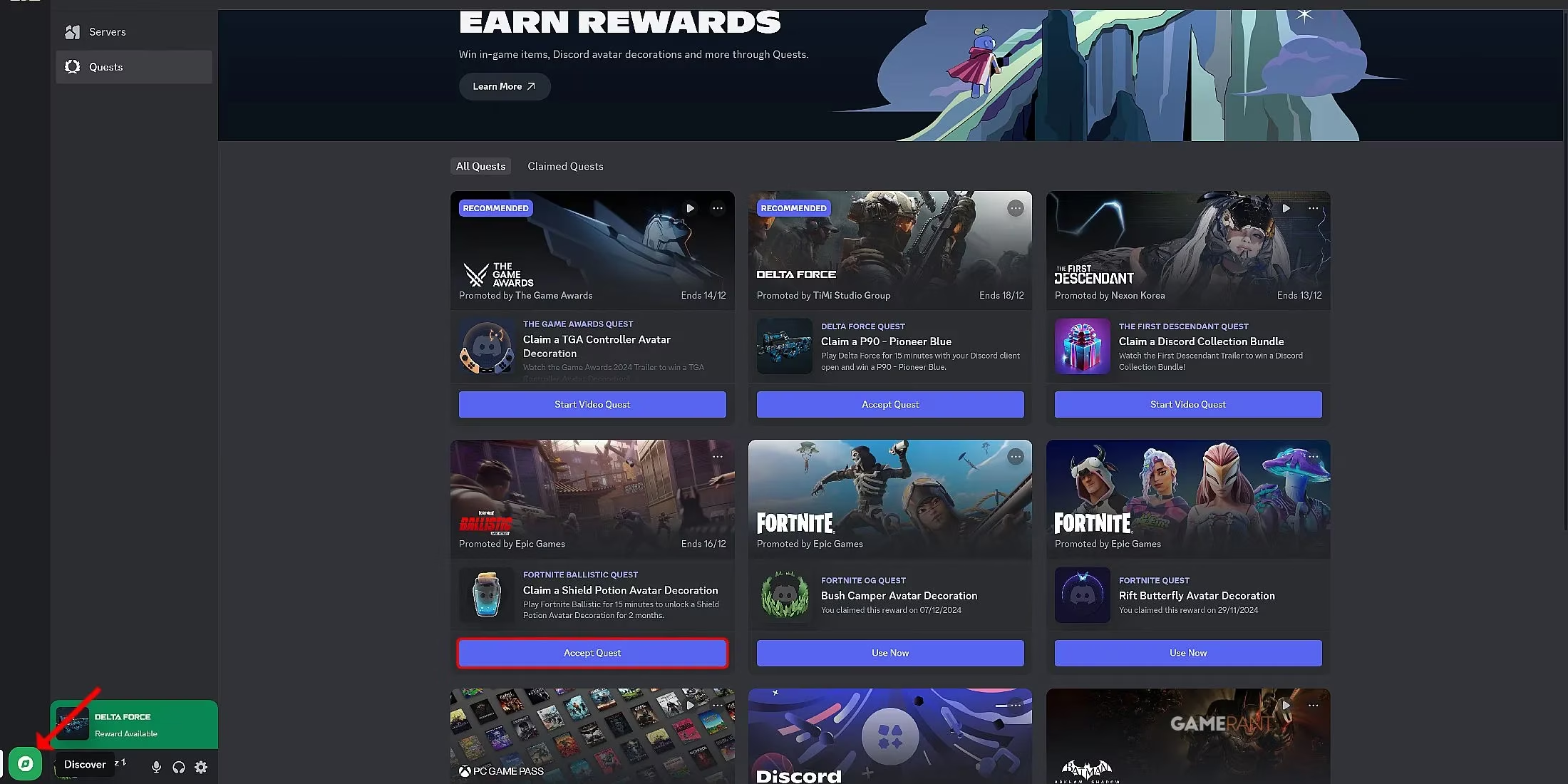
The Easy Way: Sometimes, Discord is super helpful and puts the quest right in your face. When you open the app, look just above your profile picture and username in the bottom-left corner. If you see a prompt for the "Fortnite Ballistic Quest," just click that sweet "Accept Quest" button. Boom, step one done! 🎯
-
The Manual Way: If the quest isn't popping up for you (Discord can be shy sometimes), don't sweat it. Here's the manual path:
-
Open Discord and look at the very bottom-left of your screen. You'll see a compass icon labeled "Discover." Click it!
-
Inside the Discover page, navigate to the "Quests" tab. This is where all the cool collaborative missions live.
-
Scroll through until you find the "Fortnite Ballistic Quest." It should be pretty prominent.
-
Click on it and hit "Accept Quest."
-
A final prompt will ask you to select the platform you play Fortnite on—just choose Desktop or Console as appropriate.
Step 2: Complete the Quest Requirements (It's EZ!)
Alright, you've accepted the quest. Now, what do you have to do? The quest text says you need to "Play Fortnite Ballistic for 15 minutes." But here's the 2026 insider tip that makes this an absolute cakewalk: You don't actually have to play the Ballistic mode.
Let's break down the real, no-sweat methods to complete this:
-
Play ANY Fortnite Mode: Yep, you read that right. Whether you're dropping into the classic Battle Royale, building a masterpiece in LEGO Fortnite Odyssey, racing in Rocket Racing, or jamming out in Fortnite Festival, your playtime in ANY official Fortnite mode counts. So just play the game you love for 15 minutes.
-
The Ultimate AFK Method: Need to be extra efficient? You can literally just launch Fortnite and leave it running on the main menu or in a creative hub for 15 minutes. Go grab a snack, check your phone, and let the timer tick down in the background. The quest tracks application runtime, not active gameplay. Easy peasy! 😎
Step 3: Claim and Equip Your Shield Potion!
Once your 15 minutes are up (you can usually check progress back in the Discord Quests tab), it's time for the best part: getting the loot.
-
Head back to Discord.
-
Go to the Discover > Quests tab again, or click the notification if you got one.
-
Find the completed Fortnite Ballistic Quest and click the glorious "Claim Reward" button.
-
After claiming, you'll often get an option to "Use Now." Click that, and it'll take you directly to your profile settings to equip your new decoration.
-
If you clicked away, no worries! Just go to User Settings > Profiles on Discord, and you'll find the Shield Potion Avatar Decoration ready to be selected and shown off to all your friends and servers.
Why This Collab is Still Fire in 2026
This isn't the first time Fortnite and Discord have teamed up. Remember the ethereal Rift Butterfly or the sneaky Bush Camper decorations? These collabs are a win-win. They drive engagement for both platforms and give players totally free, exclusive cosmetics that show off their gaming cred. The Shield Potion is a timeless icon, making this one of the coolest profile accessories you can get without opening your wallet.
Quick Recap & Pro Tips
To sum it all up in a neat little package:
| Step | Action | Pro Tip |
|---|---|---|
| 1 | Accept the "Fortnite Ballistic Quest" in Discord. | Check above your profile first, then use Discover > Quests. |
| 2 | Have Fortnite running for 15 minutes. | ANY mode works, or just idle in the lobby! |
| 3 | Return to Discord and claim/equip the reward. | Use the "Use Now" button for instant equipping. |
So what are you waiting for? Fire up Discord, grab that quest, let Fortnite run for a bit, and bam—you've got yourself a legendary Shield Potion for your profile. It's a small touch, but in the world of gaming flexes, every bit counts. Go get it, and see you on the island (or in the Discord DMs)! 🛡️✨